4. Installation
4.1. Requirement
Fortran Compiler (GCC or Intel)
MPI
4.2. Install
Quick installation: In the root directory edit make.inc and type make.
FOCEX
To install the FOCEX code, clone the repository https://github.com/KeivanS/Anharmonic-lattice-dynamics.git or download the ALATDYN code and follow the instructions
Edit the Makefile, generally you do not need to change the Makefile. In case if you need to change the compiler flags adjust the FLAGS option inside Anharmonic-lattice-dynamics/FOCEX/Makefile by uncommenting or adding the available option
FLAGS= -fcheck=all -fdec-math #-Wall #-fbounds-check #-fbacktrace #-ffpe-trap=invalid,zero,overflow,underflow,inexact #-inline-debug-info #-p #-pedantic #-std=f95
Navigate to the FOCEX directory and simply make the executable by using make all. This will create executable focex_$VER.x (where $VER is the version number) for FOCEX code and other executables sc_snaps.x, read_outcar.x and read_qe.x . The latter two executables are from the utility folder and create the file pos-forc.dat from every VASP OUTCAR and Quantum Espresso output log file respectively. Executables focex_$VER.x, sc_snaps.x, read_outcar.x and read_qe.x will be moved in your home directory inside aladyn folder. User can export the path by export PATH=${PATH}:~/aladyn so that it becomes available for the current shell session and put it in the terminal shell profile such as .bashrc or .bash_profile so that it is available system wide.
The other utility file sc_snaps.x generates several supercell snapshots in which atoms are displaced according to the canonical ensemble at the temperature given in the input file snaps.inp. Other input files it requires are cell.inp and supercell.inp in which the meaning of the parameters on each line is explained.
SCOP8
On Linux
To install the SCOP8 code, clone the repository https://github.com/KeivanS/Anharmonic-lattice-dynamics.git or download the ALATDYN code and follow the instructions
Edit the Makefile, generally you do not need to change the Makefile. In case if you need to change the compiler flags adjust the FLAGS option inside Anharmonic-lattice-dynamics/SCOP8/Makefile by uncommenting or adding the available option
FLAGS= #-O3 #-C # to check everything O3 #g -p #for profiling with gprofFrom the Anharmonic-lattice-dynamics/SCOP8/Makefile, simply
makeand this will create the binarymain.x
On Windows
Put MingW package under the root folder download here. The newest version of MingW may not work properly
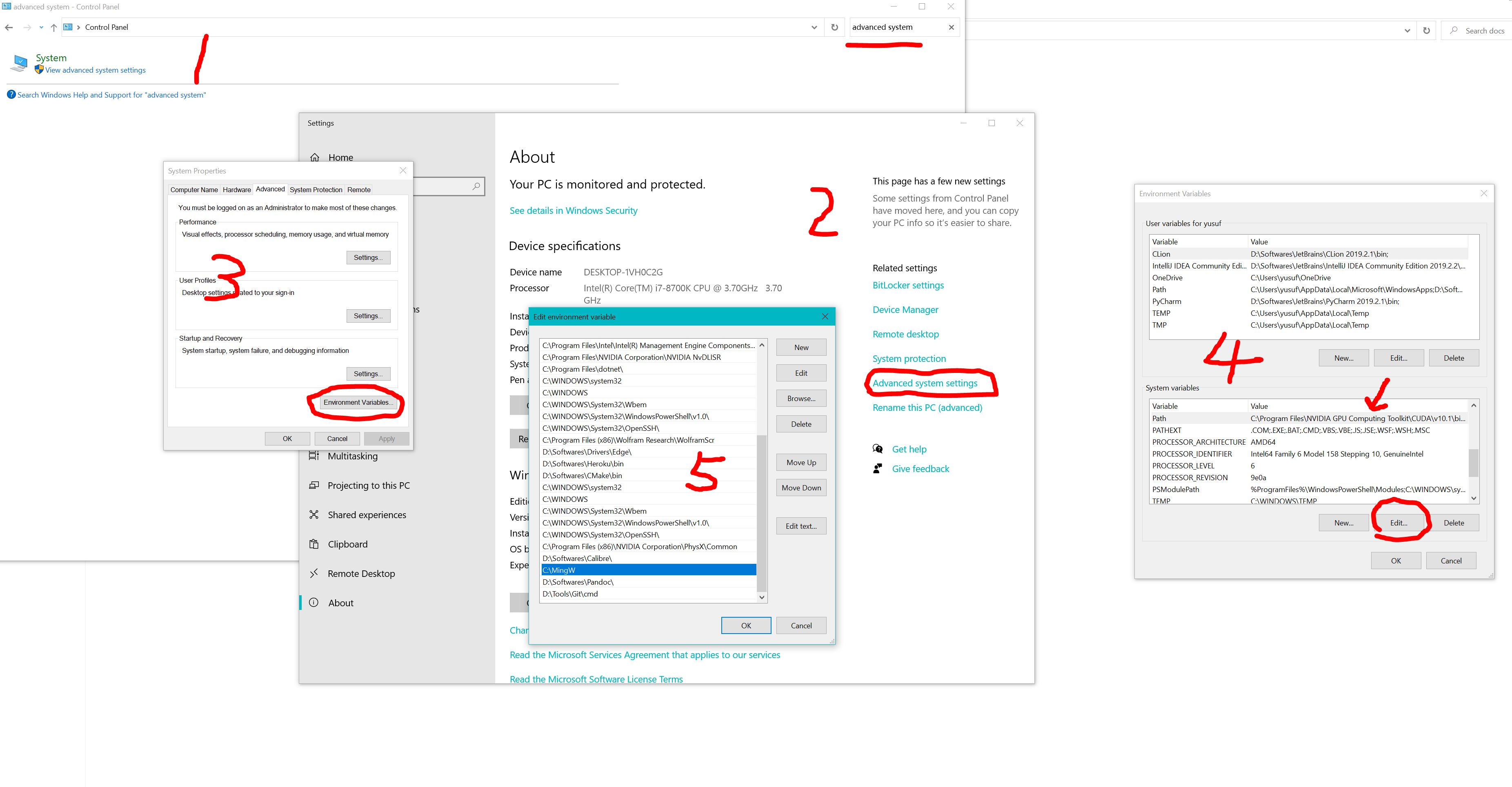
Open control panel > system advanced settings > add path of “root:\MingW”, see below
Install IDE code::blocks, download here.
Set up environment in code::blocks: go to menu > settings > compiler > set gnu fortran as default and auto detect compilers (you may need to uncheck all the optional compiling options)
Load project in code::blocks by double clicking test.cbp
Compile and run the code by pressing F9
THERMACOND
To compile the THERMACOND code, clone the repository https://github.com/KeivanS/Anharmonic-lattice-dynamics.git or download the ALATDYN code and follow the instructions
It is enough to run
makein the main directory, but a suitable Makefile must be present in the directory. THERMACOND needs a gfortran compiler. After compilation succeeds, a binary filekap8(if version is 8) will be created in the main directory. There is no need for input from the terminal. It can be invoked simply as./ kap8.In order to compute collision matrices in parallell, there is a bash script file
splitjob.shthat user can use to distribute k-mesh to many cores.